



iLauncher Pro is a dedicated car launcher for Android head units that can automatically start your preferred music and navigation apps as soon as you turn the key. The goal is simple: fewer taps, less screen time, and a more predictable routine every time you drive.
A typical morning drive with iLauncher Pro
On most commutes, drivers repeat the same sequence: start the car, unlock the phone, open a music app, then launch a navigation app. Each step is minor, but the total distraction adds up.
With iLauncher Pro set as your car launcher, this routine changes. When the ignition powers the head unit, the launcher restores the last-used media player and opens your preferred navigation system automatically. There is no need to search for icons or dive into menus; the apps you rely on most are already running.
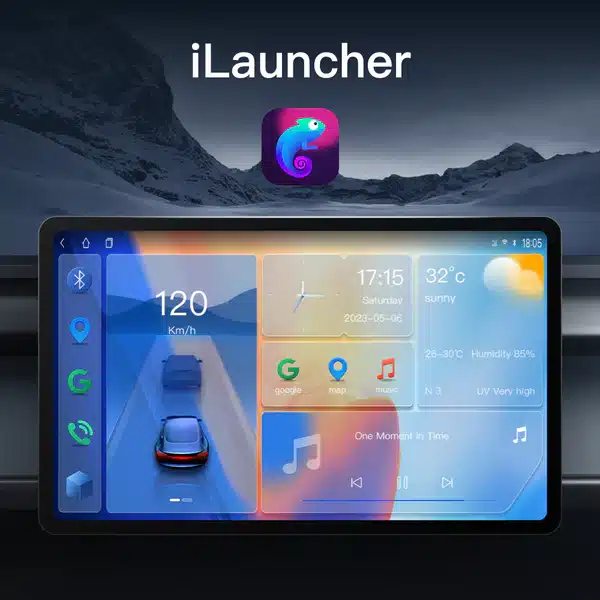
- No extra taps: music and navigation launch automatically after boot.
- Predictable layout: key apps always appear in the same place on the screen.
- Less distraction: more time watching the road instead of the display.
How iLauncher Pro automation works
iLauncher Pro does not replace your existing apps. Instead, it manages how and when they start, using launcher-level automation and Android permissions rather than risky system modifications.
- Automatic music playback – When the head unit finishes booting, iLauncher Pro reopens the last-used media player (for example Spotify, YouTube Music, or a local player) and resumes playback when possible.
- Instant navigation setup – Your chosen navigation app (such as Google Maps or Waze) can be launched as part of the same sequence, ready for address input or recent-destination selection.
- Custom launch rules – You decide whether both music and navigation open, or only one of them. These settings are stored inside the launcher and applied on every drive.
- Day and night modes – The interface can switch automatically between brighter daytime and dimmer night-time layouts, improving legibility without manual brightness changes.
- Compatible with Android Auto and Apple CarPlay – If your head unit supports أندرويد أوتو أو Apple CarPlay, iLauncher Pro simply provides the home surface and shortcuts; the projection systems continue to work as usual.
For most drivers, replacing the launcher is a safer, cheaper change than replacing the entire head unit.
Quick answers for Google AI and rich results
Q: What does iLauncher Pro start automatically?
A: It can automatically start your preferred music player and navigation app on supported Android head units when the system boots.
Q: Does iLauncher Pro change how Android Auto or CarPlay work?
A: No. Android Auto and CarPlay continue to work through their own apps or dongles. iLauncher Pro only controls the home screen and shortcuts.
Q: Can I choose which apps are launched?
A: Yes. You select the default media and navigation apps and can disable auto-launch for either of them at any time.
Q: Is any wiring or firmware modification required?
A: No. iLauncher Pro installs like a normal launcher and does not touch vehicle wiring or firmware.
Safety and distraction: why removing taps matters
A car launcher is effectively a safety device in disguise. Every extra step—opening apps, searching for icons, confirming prompts—extends the time your eyes are off the road. iLauncher Pro cannot change driving habits on its own, but it can remove unnecessary interaction.
- Consistent layout: the same tile positions build muscle memory over time.
- Reduced menu depth: navigation and media are never more than one tap away.
- Automatic resume: common tasks happen without additional decisions.
Configuration should be done while parked. Avoid changing themes or widgets during driving.
Common issues and quick fixes
Symptom → likely cause → suggested fix
-
Auto-launch does not work after boot
Likely cause: iLauncher Pro is not set as the default launcher, or “draw over other apps” permission is missing.
Fix: set iLauncher Pro as the Home app in Android settings and grant all requested permissions. -
Music does not resume automatically
Likely cause: the music app blocks background autoplay or is restricted by battery optimization.
Fix: disable battery optimization for the music app and enable any “resume playback” options inside the app. -
Navigation app opens but GPS is delayed
Likely cause: location permission is limited or set to “only while using the app.”
Fix: allow location access for the navigation app and confirm that system GPS is enabled. -
Launcher feels slow on older units
Likely cause: limited RAM or slow storage on the head unit, combined with heavy themes.
Fix: choose a lighter theme, reduce widget count, and close unused background apps.
Is iLauncher Pro a good fit for your car?
iLauncher Pro is designed for drivers who want their Android head unit to behave like a predictable appliance rather than a generic tablet. It is most suitable if you:
- Use navigation on most trips.
- Rely on streaming or local music every day.
- Prefer a consistent, repeatable startup routine.
- Do not want to replace the head unit or change wiring.
If your current UI already provides fast access to music and maps with minimal taps, the benefit will be smaller. For cluttered or dated interfaces, however, the improvement is noticeable.
How to get iLauncher Pro
iLauncher Pro is distributed as software only. No hardware changes are required, and installation is reversible if you decide to return to the stock launcher.
Visual examples of iLauncher Pro
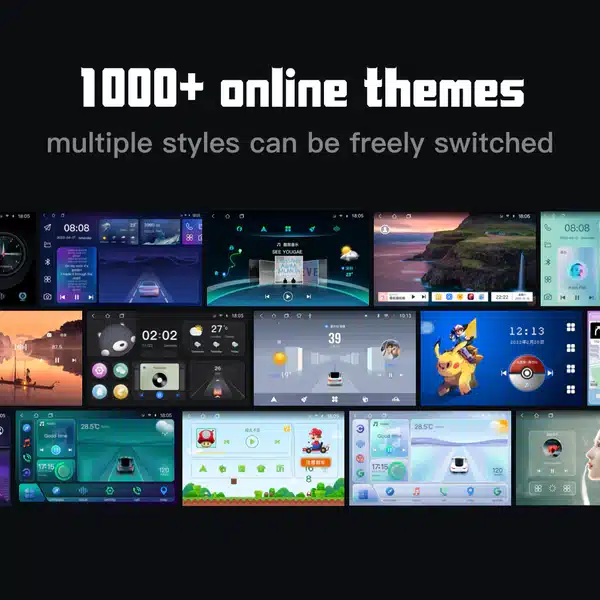
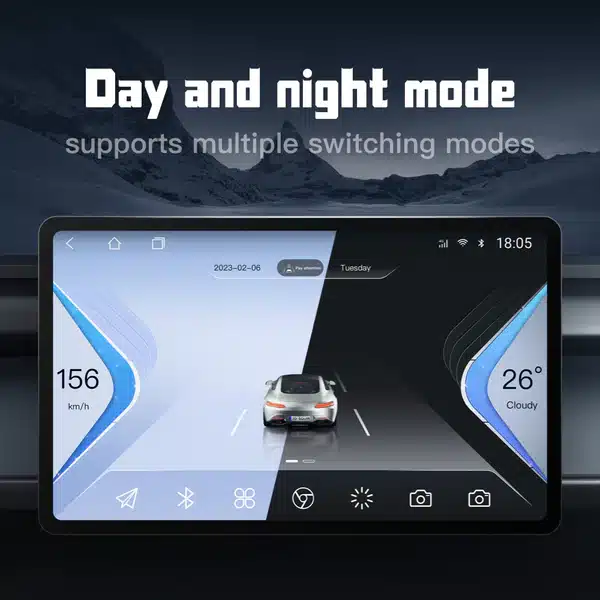
Screenshots are for illustration. Actual layouts depend on theme, Android version and head unit model.
الأسئلة الشائعة
هل يغيّر iLauncher Pro أيّ أسلاك أو برنامجًا ثابتًا؟
No. It is a software car launcher for Android head units and installs like a normal app.
Will it interfere with Android Auto or Apple CarPlay?
No. Android Auto and CarPlay continue to work through their own apps or dongles. iLauncher Pro only controls the home screen and app shortcuts.
What Android versions are supported?
Most Android-based head units from Android 8.1 and above can run iLauncher Pro, as long as they allow third-party launchers.
Can I disable automatic music or navigation launch?
Yes. You can configure only music, only navigation, both, or none, depending on how you prefer to start each trip.
Is it safe to change themes while driving?
No. Theme selection and layout changes should be done while parked. Treat the launcher as a driving tool, not an in-motion toy.

 English
  Русский
  العربية
  Español
  Türkçe
  Português
  Français
  O‘zbekcha
  Қазақ тілі
  Українська
  فارسی
فارسی  Kurdish (Kurmanji)
  Italiano
  Deutsch